
들어가기에 앞서 저번 시간 정리✨
실행은 브라우저, 노드제이에스 환경 두 가지에서 실행할 수 있다
문법적 차이는 없으나, 이용할 수 있는 리소스에 차이가 있다
function outer() {
    let count = 0;
    function inner() {
        count++;
        return count;
    }
    return inner;
}

const counter = outer();
console.log(counter()); // 1
console.log(counter()); // 2
count 는 outer() 가 호출된 이후에 접근할 수 있고, 바깥에서 조작할 수 없기 떄문에 이걸 클로저 라고 함
안쪽에서는 바깥쪽이 보이지만, 바깥쪽에서는 안쪽이 보이지 않는다는 점을 이용한 것임
⭐️ 함수도 하나의 데이터 타입으로 보자!!!
함수형 프로그래밍의 원칙 중 하나는 함수를 퓨어하게 만들자
→ 순수함수란?
- 함수 내부, 코드 블럭에서 사용하는 모든 코드 로직들은 input (파라미터 인자) 로 전달받아야만 한다
- 함수 인자로 함수를 전달받을 수도 있다는 의미도 포함됨
파이프라인 = 함수들을 통과하는 결과를 만드는 것
7. 객체
1) 자바스크립트 객체의 특성
const KEY = "SAMPLE";

const jyProfile = {
    name: "jiyeon",
    sayHi: function() {
        console.log(this.name, ": hi");
    },

    // sayHi: () => {
    //     console.log(this.name, "hihi");
    // }
    // 화살표 함수로 하면 왜 안 나오지? function 형태의 차이점 때문! this 키워드가 먹을 때 다르다?
    [KEY]: "sampleValue"
}

jyProfile.sayHi();
jyProfile["sayHi"]();   // 이렇게 둘 다 사용 가능

console.log(jyProfile.SAMPLE);  // 오브젝트 키 값은 변수로 쓸 수 있는데 이때 키값은 대괄호로 묶어줘야 한다
console.log(jyProfile['SAMPLE']);

console.log(jyProfile['sayHi']);
console.log(jyProfile.SAMPLE);
왜 화살표 함수랑 그냥 function 이랑 다르냐?
자바스크립트에서 function과 화살표 함수(=>)의 가장 핵심적인 차이점 중 하나인 this 바인딩 문제 때문!
화살표 함수는 자신만의 this를 가지지 않고, 외부 스코프의 this를 그대로 사용한다
객체 메서드에서는 반드시 function 키워드를 써야 this가 해당 객체를 제대로 가리키게 된다
2) Primitive Type 의 메서드
object는 속성(property)과 메서드를 가진다
- Primitive Type을 object화 시키자니 너무 무거움
- 원시값의 속성에 접근하면 wrapper 객체를 만들어 사용하자
let arr = ["kim", "lee"];

let [name1, name2] = arr;
console.log(name1);
console.log(name2);

const arr2 = ["a", "b", "c"];
const [v1, ...rest] = arr2;	// 여기서 ... 은 나머지 모든 인자들을 말함
console.log(v1);
console.log(rest);  // 나머지 묶어서 배열로 출력된다
3) 구조 분해 및 할당
객체나 배열에서 필요한 값을 한 줄로 꺼내서 변수에 저장하는 방법
const options = {
    title: "menu",
    width: 100,
    height: 200,
    k1: "v1",
    k2: "v2"
}

// const {title, width} = options; // 이게 객체 구조 분해 할당
// const title = options.title;
// const width = options.width; 이런 의미라고 함!

// const {title, width, ...rest} = options;

const {title, width, height:h, ...rest} = options;

console.log(title);
console.log(width);
console.log(options);

console.log(h);
console.log(rest);
cf)
// 객체 분해 할당
// person 객체의 name, age 속성을 변수로 한 번에 꺼내옴
const person = {
  name: "Alice",
  age: 30,
  job: "developer"
};

const { name, age } = person;

console.log(name); // "Alice"
console.log(age);  // 30


// 배열 분해 할당
const arr = [10, 20, 30];
const [a, b] = arr;

console.log(a); // 10
console.log(b); // 20


// 별도 분해 할당
const user = { id: 1, nickname: "JJ" };
const { nickname: userName } = user;

console.log(userName); // "JJ"


// 함수 매개변수에서도 사용 가능
function printUser({ name, age }) {
  console.log(`${name}은 ${age}살입니다.`);
}

printUser({ name: "Jin", age: 25 });
const width = 100;
const height = 200;
const obj1 = {
width: width,
height: height
// 이렇게 똑같은 경우
// width,
// height 이렇게만 써도 된다!
}
console.log(obj1);const arr1 = [1, 2, 3];
// const [n1, n2, ...rest] = arr1;
// 지금까지는 이렇게 작성을 했었는데 나는 해당하는 배열을 풀어서 받고 싶다?
const arr2 = [
...arr1,
4,
5
]; // length: 5
const arr3 = [
arr1,
4,
5
]; // length: 3, 배열이 하나의 요소로서 들어가기 때문const obj1 = {
width: 100,
height: 200
}
const obj2 = {
...obj1,
name: "jiyeon"
}
console.log(obj2);
const obj3 = {
...obj2,
width: 300
}
console.log(obj3); // 데이터 덮어씌움
8. 조건문
1) 조건문 – if / else if / else / 중첩 if문
코드의 진행 흐름을 분기하는 역할
연습문제)
사용자로 점수를 3개 입력받아 모든 점수가 65점보다 클 경우 합격 아닐경우 불합격을 출력하세요. 단, 0~100 이 아닌 숫자가 입력된경우 잘못된“잘못된 점수가 입력되었습니다" 를 출력하세요.
// 브라우저

const [a, b, c] = prompt("세 점수를 입력하세요 (예: 80 90 70)").split(" ").map(Number);

if ([a, b, c].some(score => isNaN(score) || score < 0 || score > 100)) {
    alert("잘못된 점수가 입력되었습니다");
} else if (a > 65 && b > 65 && c > 65) {
    alert("합격");
} else {
    alert("불합격");
}
연습문제)
[홀수 짝수 판별기] 사용자로부터 정수를 하나 입력받아 입력한 정수가 홀수인지 짝수인지 판별하여라. (** 0은 짝수라 하자.)
// 브라우저

const num = parseInt(prompt("정수를 입력하세요:"), 10);

if (isNaN(num)) {
    alert("잘못된 숫자가 입력되었습니다.");
} else if (num % 2 === 0) {
    alert("짝수입니다.");
} else {
    alert("홀수입니다.");
}
2) 조건문 - 물음표 연산자
let age = 10;

let result = age < 3 ? "free" :
(age < 18) ? "teenager" :
(age < 100) ? "adult" :
"hello";

console.log(result);
3) 조건문 - switch case
let str = '1';

switch (str) {
    case '1':
        console.log("1 입력");
        break;
    case '2':
        console.log("2 입력");
        break;
    case 3:
    case '3':
        console.log("3 입력");
        break;

    default:
        console.log("[1,2,3]중에 포함되지 않습니다.")
}
연습문제)
function detectBrowser(browser) {
    if (browser === 'Edge') {
        console.log("Edge를 사용중이시네요.");
    } else if (["Chrome", "Firefox", "Safari", "Opera"].includes(browser)) {
        console.log("저희 서비스가 지원하는 브라우저를 사용중이시네요.")
    } else {
        alert("현재 페이지가 괜찮아 보이길 바랍니다!")
    }
}
9. 반복문
1) for문의 다양한 형태 - for (begin; condition; step)
for (let i = 0; i < 10; i++) {
    console.log(i);
}
2) for문의 다양한 형태 - for <변수> in <object>
배열도 object의 일종이니 가능함, key 또는 index를 반환
const obj = {
    name: "jiyeon",
    city: "seoul",
    height: 160
}

for (let key in obj) {
    console.log(key);
}

const arr = ['a', 'b', 'c'];

for (let key in arr) {
    console.log(key);      // 출력: 0, 1, 2 - key는 배열의 인덱스 (문자열 형태)
    console.log(arr[key]); // 출력: 'a', 'b', 'c' - arr[key]로 접근하면 해당 인덱스의 값이 나옴
}
3) for문의 다양한 형태 - for <변수> of <array>
of로 사용하면 item에는 각 배열 index에 해당하는 value가 들어오게 됨
const arr = ['a', 'b', 'c'];

for (let item of arr) {
    console.log(item);
}
연습문제)
(1) 사용자로부터 정수를 입력받아, 해당 정수만큼 “안녕”을 출력하세요.
(2) 사용자로부터 정수를 입력받아, 입력된 정수 만큼 별 찍기
(3) 사용자로부터 정수를 입력받아, 입력된 정수 만큼 별 찍기(역순)
// (1) 사용자로부터 정수를 입력받아, 해당 정수만큼 "안녕"을 출력하세요.
const inputValue1 = parseInt(prompt("정수입력"));
for (let i = 0; i < inputValue1; i++) {
    console.log("안녕");
}

// (2) 사용자로부터 정수를 입력받아, 입력된 정수 만큼 별 찍기
const inputValue2 = parseInt(prompt("정수입력"));
for (let i = 0; i < inputValue2; i++) {
    console.log("*".repeat(i + 1));
}

// (3) 사용자로부터 정수를 입력받아, 입력된 정수 만큼 별 찍기(역순)
const inputValue3 = parseInt(prompt("정수입력"));
for (let i = inputValue3; i > 0; i--) {
    console.log("*".repeat(i));
}
연습문제)
(1) let x = [3, 6, 9, 20, -7, 5] 의 값의 모든 요소에 10을 곱한 뒤 출력하세요
(1-1) 심화 : 출력과 배열 x 의 값에도 모두 10을 곱해주세요
(2) let y = {“math”: 70, “science”: 80, “english”: 20}의 값의 모든 요소에 10을 더한 뒤 출력하세요
(2-1) 심화 : 출력과 object y 의 값에도 모두 10을 더해주세요
(3) 숫자를 입력받고 입력받은 정수의 구구단을 출력하세요
// (1) let x = [3, 6, 9, 20, -7, 5] 의 값의 모든 요소에 10을 곱한 뒤 출력하세요
let x = [3, 6, 9, 20, -7, 5];
for (let item of x) {
    console.log(item * 10);
}

// 위와 같은 코드(배열로 출력)
// let result = x.map(v => v * 10);
// console.log(result);


// (1) 심화 : 출력과 배열 x 의 값에도 모두 10을 곱해주세요
let x2 = [3, 6, 9, 20, -7, 5];
x2 = x2.map(v => v * 10);
console.log(x2);


// (2) let y = {“math”: 70, “science”: 80, “english”: 20}의 값의 모든 요소에 10을 더한뒤 출력하세요
let y = { "math": 70, "science": 80, "english": 20 };

for (let item in y) {
    console.log(y[item] + 10);
}

//위와 같은 코드(배열로 출력)
// let updated = {};
// for (let subject in y) {
//     updated[subject] = y[subject] + 10;
// }
// console.log(updated);


// (2) 심화 : 출력과 object y 의 값에도 모두 10을 더해주세요
for (let subject in y) {
    y[subject] += 10;
}
console.log(y);


// (3) 숫자를 입력받고 입력받은 정수의 구구단을 출력하세요
const readline = require('readline');

const rl = readline.createInterface({
    input: process.stdin,
    output: process.stdout
});

rl.question("구구단 숫자를 입력하세요: ", function (input) {
    const num = parseInt(input, 10);

    if (isNaN(num)) {
        console.log("잘못된 숫자입니다.");
    } else {
        for (let i = 1; i <= 9; i++) {
            console.log(`${num} x ${i} = ${num * i}`);
        }
    }

    rl.close();
});
연습문제)
(1) word = [“school”, “game”, “piano”, “science”, “hotel”, “mountian”] 중 글자수가 6글자 이상인 문자를 모아 새로운 배열을 생성하세요
(2) 구구단을 1단부터 9단까지 출력하세요
// (1) word = [“school”, “game”, “piano”, “science”, “hotel”, “mountian”] 중 글자수가 6글자 이상인 문자를 모아 새로운 배열 생성하세요
let word = ["school", "game", "piano", "science", "hotel", "mountian"];
let updated = [];

for (let i = 0; i < word.length; i++) {
    if (word[i].length >= 6) {
        updated.push(word[i]);
    }
}
console.log(updated);

// let updated = word.filter(w => w.length >= 6);
// console.log(updated);


// (2) 구구단을 1단부터 9단까지 출력하세요
for (let i = 1; i <= 9; i++) {
    console.log(`\n--- ${i}단 ---`);
    for (let j = 1; j <= 9; j++) {
        console.log(`${i} x ${j} = ${i * j}`);
    }
}
연습문제)
1-100 까지 숫자 중 3과 5의 공배수일 경우 “3과 5의 공배수”, 나머지 숫자 중 3의 배수일 경우 “3의배수”, 나머지 숫자 중 5의 배수일 경우 “5의배수”, 모두 해당되지 않을경우 그냥숫자를 출력하세요
심화 : 1-입력한 숫자까지의 숫자 중
// 1-100 까지 숫자 중 3과 5의 공배수일경우 “3과 5의 공배수”
// 나머지 숫자중 3의배수일경우 “3의배수”
// 나머지 숫자중 5의배수일경우 “5의배수”
// 모두 해당되지 않을경우 그냥숫자를 출력하세요
for (let i = 1; i <= 100; i++) {
    if (i % 3 === 0 && i % 5 === 0) {
        console.log(`${i}: 3과 5의 공배수`);
    } else if (i % 3 === 0) {
        console.log(`${i}: 3의 배수`);
    } else if (i % 5 === 0) {
        console.log(`${i}: 5의 배수`);
    } else {
        console.log(i);
    }
}


// 심화 : 1 - 입력한 숫자까지의 숫자 중 ~ 출력
const readline = require('readline');

const rl = readline.createInterface({
    input: process.stdin,
    output: process.stdout
});

rl.question("숫자를 입력하세요: ", function (input) {
    const max = parseInt(input, 10);

    if (isNaN(max) || max < 1) {
        console.log("1 이상의 정수를 입력하세요.");
        rl.close();
        return;
    }

    for (let i = 1; i <= max; i++) {
        if (i % 3 === 0 && i % 5 === 0) {
            console.log(`${i}: 3과 5의 공배수`);
        } else if (i % 3 === 0) {
            console.log(`${i}: 3의 배수`);
        } else if (i % 5 === 0) {
            console.log(`${i}: 5의 배수`);
        } else {
            console.log(i);
        }
    }

    rl.close();
});


// 강사님께서는 아래와 같이 변수 자체를 설정해서 if 문에 넣으셨다
// 아직 자바에서 벗어나지 못한 나 .. 나의 자바 세상이 무너진다아아악
// const mul3 = i % 3 === 0;
// const mul5 = i % 5 === 0;
4) while문 / do-while문
// while
let i = 0;

while (i < 3) {
    console.log(i);
    i++;
}


// do - while
let j = 0;

do {
    console.log(i);
    i++;
} while (i < 3)
5) 반복문을 제어하는 문법 (continue & break)
반복문(Loop)내에서 continue를 사용하면 반복문 내에 뒤 코드는 진행하지 않고 반복문 초기 (조건 검사)로 다시 돌아가서 실행
break를 사용하면 그 시점에서 바로 반복문을 빠져나온다
for (let i = 0; i < 10; i++) {
    if (i % 2 == 0) {
        continue;
    }

    console.log(i);
}


for (let j = 0; j < 10; j++) {
    if (j === 4) {
        break;
    }

    console.log(j);
}
연습문제)
사용자가 100보다 큰 숫자를 입력하도록 안내하기 - 사용자가 조건에 맞지 않은 값을 입력한 경우 반복문을 사용해 동일한 입력을 받기
(사용자가 오직 숫자만 입력한다고 가정하고 답안을 작성하도록 해봅시다. 숫자가 아닌 값이 입력되는 예외 상황은 처리하지 않아도 됩니다.)
이번 코드는 브라우저에서 진행합니다.(node.js에는 prompt 없으며, 동기적으로 받는 내장 함수 X)
browser에서 입력받기
> prompt(“알림 내용”);
while (true) {
    const num = parseInt(prompt("100보다 큰 정수를 입력하세요:"));

    if (num > 100) {
        alert(num);
    }
}
연습문제)
함수와 숫자 n을 받아서, 주어진 함수가 최대 n번만 호출될 수 있도록 하는 limitCalls 함수를 작성하세요.
function limitCalls(func, n) {
    let count = 0;
    return function () {
        if (count < n) {
            func();
        }
        count++;
    }
}

const limitedHello = limitCalls(() =>
    console.log("Hello!"), 2);
limitedHello(); // "Hello!"
limitedHello(); // "Hello!"
limitedHello(); // 아무 일도 일어나지 않음.
10. 예외처리
1) 예외를 위한 try catch
에러 객체 : 자바스크립트에서 에러는 Error 객체를 통해 표현된다. Error 객체에는 에러 메시지, 발생한 에러의 이름, stack trace가 포함될 수 있다. (stack trace : 실행 시점의 함수 호출 스택)
try {
    const sentence = `{"name": "신윤수", "city": "서울"}`;
    const data = JSON.parse(sentence);
    console.log(data);
} catch (err) {
    console.log("[에러 발생]");
    console.error(err);
}

try {
    throw new Error("my error");    // 직접 에러 발생
} catch (err) {
    console.log("err detect");
    console.error(err);
}
11. 동기 vs 비동기
1) 비동기에 대한 이해 (Asynchrouns)
자바스크립트는 대부분 비동기적으로 동작한다
비동기란? 코드가 즉시 실행되지 않고, 일정 시간이 지난 뒤 결과가 나오는 경우(ex. 서버에서 데이터 요청 → 시간이 걸림 → 바로 응답이 안 옴)
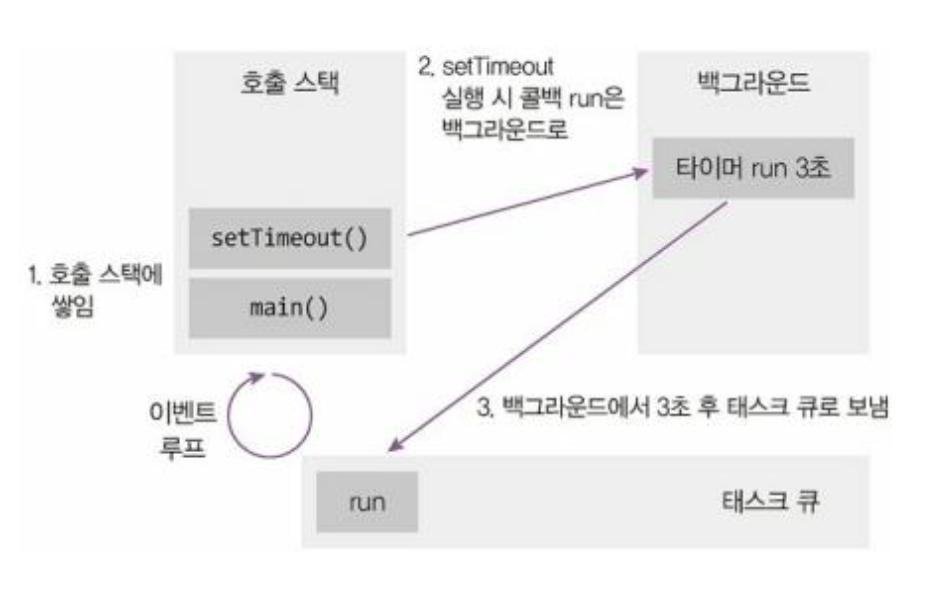
비동기 함수는 나중에 끝나기 때문에, 끝난 다음에 실행해야 할 코드를 그냥 뒤에 써두면 아직 끝나지 않아서 실행이 안 되거나, 데이터가 없는 상태에서 실행될 수 있음
→ 비동기 함수가 완료될 경우에 처리할 function을 함께 넣어주자! - 작업이 끝난 뒤에 실행할 함수를 함수의 인자로 전달하는 방식 - 이게 callback function
// 파일을 다운로드하는 비동기 함수 정의
// done: 다운로드 완료 후 실행할 콜백 함수
function downloadFile(done) {
  // 2초 뒤에 실행되는 비동기 코드 (다운로드 시뮬레이션)
  setTimeout(() => {
    console.log("파일 다운로드 완료"); // 다운로드 완료 메시지 출력
    done(); // 전달받은 콜백 함수 실행
  }, 2000); // 2초 후 실행
}

// downloadFile 함수 호출
// 다운로드 완료 후 실행할 콜백 함수(화살표 함수)를 전달
downloadFile(() => {
  console.log("이제 파일을 처리하세요"); // 콜백 함수 내부: 파일 처리 작업
});
이로써 완벽히 이해했다! 우하하
자바랑 비슷한 듯 달라서 함수 하나 이해하는데도 오래 걸리네 ㅠㅡㅠ
2) 전통적인 방식
전통적인 방식 (callback function) 비동기적으로 전달하되, 비동기 함수 내에서 블로킹 한 후에 호출할 함수를 함께 전달해주자!
fastFunction, slowFunction 은 동기적으로 처리해야 함
// 틀린 코드
function fastFunction(arr, data, done) {
    setTimeout(function () {
        const result = data * 2;
        return result;   // 이렇게는 못 씀
    }, 1000)
}

function slowFunction(arr, data, done) {
    setTimeout(function () {
        const result = data + 10;
        return result;   // 이렇게는 못 씀
    }, 3000)
}

// setTimeout() 안의 함수는 비동기적으로 실행되므로, return 값은 바깥 코드에서 받을 수 없습니다.
// 즉, let num = fastFunction(10); → num은 항상 undefined입니다.

let num = fastFunction(10);
num = slowFunction(num);

fastFunction(10, (data) => {
    console.log("fastFunction complete");
    slowFunction(data, (result => {
        console.log("slowFunction complete");
        console.log(result);
    }))
})
// 옳은 코드
function fastFunction(err, data, done) {
setTimeout(function () {
const result = data * 2;
done(undefined, result);
}, 1000)
}
function slowFunction(err, data, done) {
setTimeout(function () {
const result = data + 10;
done(undefined, result);
}, 3000)
}
function runTasks() {
let num = 10;
fastFunction(undefined, num, (err, data) => {
console.log("fastFunction running", data);
slowFunction(undefined, data, (err, data) => {
console.log("slowFunction", data);
})
})
}
runTasks();
slowFunction까지 같이 인자로 넣어줘야 한다? 왜?
- 비동기 함수는 완료될 때까지 기다리지 않고 다음 코드로 넘어감, 그래서 fastFunction이 끝나기도 전에 slowFunction을 실행하면, fastFunction의 결과가 아직 안 나왔는데 slowFunction이 실행되는 상황 발생(이미 분기된 상황이므로)
- 그래서 fastFunction이 끝났을 때 실행할 함수(다음 흐름)를 미리 전달해야 함, 이를 콜백 함수(callback function) 라고 부르며 done이라는 이름으로 보통 전달함
- fastFunction 안에서 작업이 끝나면 done(result)를 직접 호출해야 함, done()을 호출하지 않으면 fastFunction의 결과는 외부로 절대 전달되지 않고 slowFunction도 실행되지 않음
그런데 이 방식은 가독성이 너무 떨어진다!
지금은 callback이 하나지만 이어지는 함수가 많아지면, 코드의 깊이가 깊어지고 가독성이 떨어짐 = 콜백지옥
그래서 나타난 게 Promise 객체!
3) 더 나은 방식– Promise 객체
Promise 객체 생성시 내부에서 자동으로 호출하여 resolve 및 reject 시켜줌
const promise = new Promise((resolve, reject) => {
    // resolve, reject 는 함수
    // resolve 성공했을 때 호출할 함수
    // reject 실패했을 때 호출할 함수

})

function fastFunction(data) {
    return new Promise((resolve, reject) => {
        setTimeout(function () {
            const result = data * 2;
            resolve(result);
        }, 1000)
    })
}

function slowFunction(data) {
    return new Promise((resolve, reject) => {
        setTimeout(function () {
            if (data === 0) {
                reject(new Error("no zero"))
            } else {
                const result = data + 10;
                resolve(result);
            }
        })
    }, 3000)
}

slowFunction(0).then(data => {
    console.log("slowFunction call result");
    console.log(data);
}).catch(err => {
    console.log(err);
});

slowFunction(10).then(data => {
    console.log("fastFunction complete");
    console.log(data);
    return data;
}).then(data => {
    return fastFunction(data);
}).then(data => {
    return slowFunction(data);
}).then(data => {
    return fastFunction(data)
})

const result = fastFunction(10);
result.then(data => {  // Promise.then()
    console.log("fastFunction running result");
    console.log(data);
    return data;

}).then(data => {
    return slowFunction(data);

}).then(data => {
    console.log("slowFunction running result");
    console.log(data);
})
코드의 depth가 깊어지진 않으니 callback보다는 좋아보인다!
그런데 여전히 then, catch로 함수를 전달해주는 것이 마음에 들지 않는다 = then지옥
4) 가장 최근 방식– Async & Await
- async Function : Promise 객체(Function이 아님)
- await : Promise가 처리되기를 기다리는 키워드
비동기적인 코드를 함수의 문법(키워드)으로 추가하자 = 마치 동기적 코드처럼 비동기 함수를 작성하자
즉, async/await는 Promise를 더 간단하고 가독성 좋게 사용하는 방법으로, 따로 쓰는 게 아니라 Promise 위에 만들어진 문법(syntax sugar)입니다.
const delay = ms => new Promise(resolve => setTimeout(resolve, ms));

async function fastFunction(data) {
    await delay(1000);
    const result = data * 2;
    return result;
}

async function slowFunction(data) {
    await delay(3000);
    const result = data + 10;
    console.log("slowFunction 완료", result);
    return result;
}

async function runTasks() {
    // fast -> slow
    let result = await fastFunction(10);
    console.log("fastFunction 완료", result);
    result = await slowFunction(result);
    console.log(result);
}
const task = runTasks();
console.log("task", task);
5) Promise 관련 함수– 복잡한 비동기 로직 관리
- Promise.all() - 비동기 함수를 병렬적으로 실행하고 모아서 작업 (하나라도 reject시 reject)
- Promise.all 메서드는 Promise 객체의 배열을 인자로 받음
- 모든 Promise가 성공적으로 이행(resolved)될 때까지 기다림
→ 모든 Promise가 이행되면, 각 Promise의 결과값을 담은 배열이 이행 값으로 반환
→ 만약 하나라도 거부(rejected)되면, Promise.all은 즉시 reject
const delay = ms => new Promise(resolve => setTimeout(resolve, ms));

async function slowFunction(data) {
    await delay(3000);
    if (data === 0) {
        throw new Error("에러 발생")
    }
    const result = data + 10;
    return result;
}

async function fastFunction(data) {
    await delay(1000);
    if (data === 0) {
        throw new Error("에러 발생");
    }
    const result = data * 2;
    return result;
}

// 복잡한 비동기 로직 관리
// 1. 다양한 데이터 소스에 있는 데이터를 조회한 후 함께 작업을 가정
const task1 = fastFunction(10);
const task2 = slowFunction(100);

// task1의 data-type: Promise객체,
Promise.all([task1, task2]).then(([result1, result2]) => {
    return result1 + result2;
    // console.log('task1 result:', result[0]);
    // console.log('task2 result:', result[1])
}).then(data => {
    console.log(data);
})
- Promise.race() - Promise가 하나라도 이행되거나 거부되면, 그걸로 끝 (경쟁시킬래)
- Promise.race 메서드는 Promise.all과 유사하게 Promise 객체의 배열을 인자로 받지만, 배열 내의 Promise 중 하나라도 이행하거나 거부되는 즉시, 그 Promise의 결과(이행 값 또는 거부 사유)와 함께 실행을 완료함 - 즉, 경주에서 이기는 첫 번째 Promise의 결과만 가져온다
const delay = ms => new Promise(resolve => setTimeout(resolve, ms));

async function slowFunction(data) {
    await delay(3000);
    if (data === 0) {
        throw new Error("에러 발생")
    }
    const result = data + 10;
    return result;
}

async function fastFunction(data) {
    await delay(1000);
    if (data === 0) {
        throw new Error("에러 발생");
    }
    const result = data * 2;
    return result;
}

// Promise.race([fastFunction(10), slowFunction(20)]).then(result=>{
//     console.log(result);
// })

Promise.race([fastFunction(0), slowFunction(20)]).then(result => {
    console.log(result);
}).catch(err => {
    console.log(err);
})
- Promise. allSettled() - 모든 Promise가 resolve 혹은 reject를 기다림, 비동기 함수를 병렬적으로 실행하고 모아서 작업
- Promise.allSettled 메서드는 성공이든 실패든 모든 프로미스의 완료를 기다림, 그리고 각 프로미스의 결과에 대한 정보를 담은 객체 배열을 반환함
- 각 객체는 { status, value } 또는 { status, reason }의 형태를 가지며, fulfilled된 프로미스는 value 속성을, rejected된 프로미스는 reason 속성을 가짐
- status는 "fulfilled" 또는 "rejected“
const delay = ms => new Promise(resolve => setTimeout(resolve, ms));

async function slowFunction(data) {
    await delay(3000);
    if (data === 0) {
        throw new Error("에러 발생")
    }
    const result = data + 10;
    return result;
}

async function fastFunction(data) {
    await delay(1000);
    if (data === 0) {
        throw new Error("에러 발생");
    }
    const result = data * 2;
    return result;
}

Promise.allSettled([
    fastFunction(10),
    slowFunction(20),
    fastFunction(0),
    slowFunction(20)]
).then(([result1, result2, result3, result4]) => {
    console.log(result1);
    console.log(result3);
})
- Promise.any() - 하나가 성공할 때 까지 기다림
- Promise.any 메서드는 주어진 Promise 중 하나라도 resolved되면 즉시 그 프로미스의 결과값으로 fullfiled하는 새로운 Promise를 반환
- 모든 프로미스가 거부(rejected)될 경우, AggregateError 타입의 에러와 함께 rejected 됨
총정리)
| 메서드 | 성공 조건 | 실패 조건 | 결과 형태 | 예시 상황 |
| Promise.all() | 모든 Promise가 fulfilled | 하나라도 rejected | 첫 reject 이유 반환 | 모두 성공해야 할 때 (ex. 병렬 API 응답 기다릴 때) |
| Promise.allSettled() | 모든 Promise가 settled | 실패 없음 (전부 상태 반환) |
각 Promise 상태 객체 리스트 | 성공/실패 구분 없이 전부 처리하고 싶을 때 |
| Promise.race() | 가장 먼저 settled | 가장 먼저 실패해도 즉시 reject |
가장 먼저 끝난 하나의 결과 | 가장 빠른 응답만 필요할 때 (ex. 타임아웃 제어 등 우선값 사용) |
| Promise.any() | 가장 먼저 fulfilled | 전부 실패하면 AggregateError |
가장 먼저 성공한 결과 | 하나라도 성공하면 OK일 때 (ex. 여러 백업 요청 중 첫 성공값) |
| 상태 | 설명 | 결과 처리 방식 | |
| pending | 아직 결과 안 나옴 | 기다리는 중 | |
| fulfilled | 작업 성공 (resolve) | 둘 합쳐서 settled | .then() 사용 가능 |
| rejected | 작업 실패 (reject) | .catch() 사용 가능 | |
| settled | 성공 or 실패로 종료됨 | 더 이상 변화 없음 | |
12. 자바스크립트의 객체지향 프로그래밍
1) 자바스크립트의 OOP - Prototype
자바스크립트는 클래스 기반 OOP처럼 보이지만, 실제로는 프로토타입 기반 OOP를 사용한다
prototype 이란?
모든 자바스크립트 객체는 다른 객체를 참조할 수 있고, 그 참조 대상이 prototype
즉, 객체가 직접 가지고 있지 않은 속성이나 메서드를 prototype 체인을 통해 찾는 것임
__proto__는 객체가 상속받는 부모 객체(prototype)를 가리키는 내부 참조 (자기 자신(this)에 있는가? - 없으면 __proto__를 따라 올라가 prototype 객체에서 찾음)
왜 사용하나?
자바스크립트는 메서드를 각 객체에 복사하지 않고, 공통된 기능은 prototype에 두고 공유함 (메모리 절약 + 일관된 메서드 사용을 위해서)
// prototype
function Animal(name) {
    this.name = name;
    this.hungry = 0;
}

/**
 * 메서드 정의는 생성자 함수의 prototype이라는 객체에 정의.
 * prototype은 객체가 모두 공유할 함수의 집합
 */
Animal.prototype.eat = function () {
    console.log(`${this.name}이 먹는다.`);
    this.hungry -= 10;
}
Animal.prototype.run = function () {
    console.log(`${this.name}이 달린다.`);
    this.hungry += 10;
}

/**
 * function을 정의하고 new 키워드와 함께 호출하면 그 즉시 객체
 * 이 때 해당 function은 생성자
 */

/**
 * 인스턴스의 __proto__가 해당하는 생성자 함수의 prototype을 참조.
 */


/**
 * 객체는 호출된 속성 중 본인이 가지지 않은 것이 접근 되면,
 * __proto__를 참조하여 해당하는 속성이 있는지 확인.
 */


/**
 * 상속.
 */
function Rabbit(name, color) {
    // console.log(arguments)
    Animal.apply(this, arguments);
    this.color = color;
}

/**
 * Rabbit이 공유할 prototype은 Animal의 protype을 기반해서 만든다.
 */
Rabbit.prototype = Object.create(Animal.prototype);
// 새로운 메서드를 작성한다.
Rabbit.prototype.newFunction = function () {
    console.log("새로운 기능!");
}

/**
 * 특수한 키워드.
 * this, arguments
 */
const rabbit = new Rabbit("토깽이", "red");
console.log(rabbit.__proto__)
rabbit.newFunction();
rabbit.run();
rabbit.eat();
- 함수이름.apply(thisArg, [argsArray])
- thisArg: 함수 내부에서 this로 사용될 객체 - null 또는 undefined를 전달할 경우, 기본적으로 전역 객체 (window 또는 global)가 this로 사용
- argsArray: 함수에 전달할 인자들의 배열, 함수에서는 이 배열의 요소들을 개별 인자로 받음
'Education > 신한투자증권 프로 디지털 아카데미' 카테고리의 다른 글
| JavaScript 크롤링 딥 다이브💦 (7) | 2025.06.06 |
|---|---|
| JavaScript cheerio 사용해서 크롤링 해보기 (2) | 2025.06.06 |
| JavaScript 기초 (7) | 2025.05.29 |
| [신한투자증권 프로디지털 아카데미] 실무형 웹페이지 실습(1) - 포트폴리오 만들기 (1) | 2025.05.25 |
| [신한투자증권 프로 디지털 아카데미] UI/UX 디자인과 구현(3) (HTML/CSS) (0) | 2025.05.25 |