3. 브라우저를 위한 JavaScript
1. 브라우저를 위한 자바스크립트
1) document 객체와 주요 함수
document 객체: 현재 웹 페이지에 대한 진입점 역할을 하며, 문서의 내용, 구조, 스타일 정보에 접근할 수 있다
2) 이벤트(Event)
: 이벤트는 웹 페이지 상에서 사용자의 동작이나 브라우저의 특정 활동에 반응하여 발생하는 신호 또는 알림
: 즉, 사용자가 웹 상에서 하는 모든 행동을 말함
3) 이벤트 리스너와 이벤트 객체
: 이벤트 리스너는 특정 이벤트가 발생했을 때 호출되는 함수
: 이벤트 객체는 이벤트 type, target요소, 이벤트와 관련된 데이터 포함
element.addEventListener
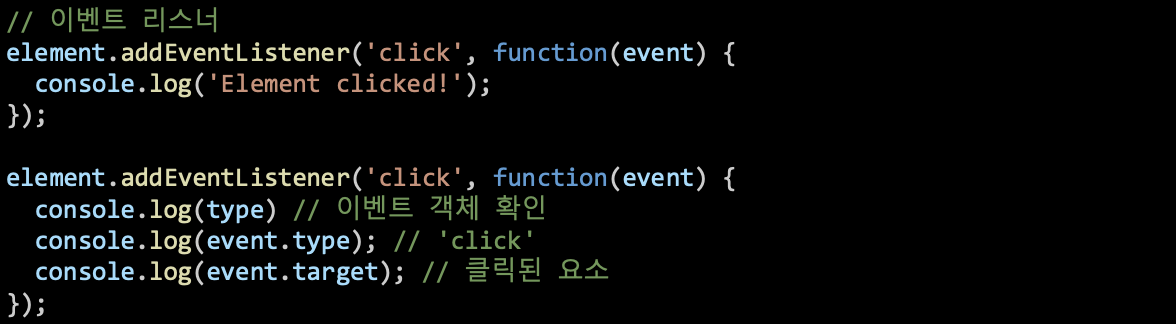
element.onClick = () => {}
: 한 번만 등록이 가능하고 복수의 이벤트 핸들러를 등록하는 것이 불가하기 때문에 addElementListener 를 사용하는 것을 표준으로 한다
<button onclick="sayHi()">Click me</button>
: 간단하지만 코드가 길어지는 경우 유지보수가 어렵다는 단점이 있다
연습문제)
input tag를 두 개 만들어서 두 input이 입력될때마다 input의 합이 출력되는 함수를 작성하여라.
const input1 = document.getElementById('input1');
const input2 = document.getElementById('input2');
const result = document.getElementById('result');

function onChangeInput(e){
    const input1Value = isNaN(parseFloat(input1.value)) ? 0 : parseFloat(input1.value);
    const input2Value = isNaN(parseFloat(input2.value)) ? 0 : parseFloat(input2.value);

    result.innerHTML = input1Value + input2Value;
}

input1.addEventListener('input', onChangeInput);
input2.addEventListener('input', onChangeInput);
// html
<h2>숫자 합 계산기</h2>
<input type="number" id="input1" placeholder="숫자 1">
<input type="number" id="input2" placeholder="숫자 2">
<p>합: <span id="result">0</span></p>
<script src="js1.js"></script>
4) 이벤트 전파 - Event Propagation
: 이벤트가 발생했을 때 DOM 트리를 통해 이벤트가 전달되는 방식
- 캡처링 단계: 이벤트가 최상위 노드에서부터 이벤트 타깃까지 전달 - 브라우저가 인지함
- 타깃 단계: 이벤트가 타깃 요소에서 처리 - 타깃에서부터 리스너 함수가 실행
- 버블링 단계: 이벤트가 타깃 요소에서부터 다시 최상위 노드까지 올라감 - 부모 노드의 이벤트 리스너 호출로 전파
const box1 = document.getElementById('box1');
const box2 = document.getElementById('box2');
const box3 = document.getElementById('box3');

function onClickEvent(e) {
    e.stopPropagation();
    console.log('클릭 이벤트');
}

box1.addEventListener('click', onClickEvent);
box2.addEventListener('click', onClickEvent);
box3.addEventListener('click', onClickEvent);- box3(leaf node)을 클릭하게 되면 최상위 노드인 box1까지 이벤트가 버블링 되어 이벤트 핸들러가 3개 실행되는 것을 볼 수 있다→ e.stopPropagation() 을 활용해 이벤트 전파를 막을 수 있다 = 이벤트 중첩 방지
5) 이벤트 기본 처리 변경– preventDefault
: form의 submit button 같은 경우 기본적인 이벤트 리스너(default event method)가 등록되어 있는데, 이를 중단하기 위해 preventDefault( ) 사용 - 브라우저의 기본 동작 자체를 막는 것
6) 통신을 위한 fetch 함수
: 웹에서 데이터를 가져오거나 보내기 위한 자바스크립트의 내장 함수
- 기본구조: fetch(url).then().catch()

- request 의 4가지 method: GET, POST, PUT, DELETE
4. 웹 통신의 이해
1. 웹 통신이란
1) TCP vs UDP

TCP: 응답이 있는 통신 - 대부분의 웹 통신, 안전한 연결
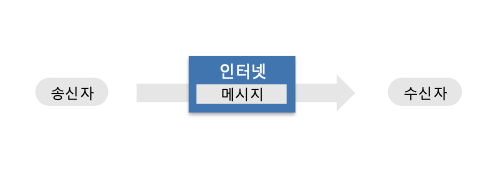
UDP: 응답이 없는 통신 - 빠른 반응을 요하는 게임, 동영상 스트리밍(Youtube), VoIP, mVoIP
2) 웹 통신의 구조
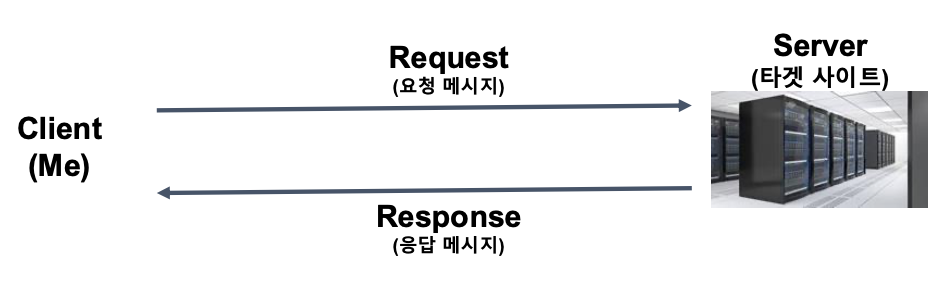
Client는 서버에게 HTTP Request를 보내고 - Response를 받아서 - UI를 그린다
⭐️ 웹은 리퀘스트를 보내면 리스폰스가 온다 !!!
3) Request의 메소드 (HTTP Method)
- GET (가져오기)
- POST (등록하기)
- PUT (수정하기)
- DELETE (삭제하기)
4) Response Status Code (HTTP Status Code)
: 요청을 받으면 서버는 응답을 줄 의무가 있다
- 2XX (성공)
- 3XX (Page Redirection)
- 4XX (Client Error 요청오류)
- 5XX (Server Error 응답오류)
5) XML/JSON (A.K.A. 메시지 body)
| 구분 | XML(eXtensible Markup Language) | JSON(JavaScript Object Notation) |
| 구조 형식 | 태그 기반 (<tag>value</tag>) | 키-값 쌍 ({ "key": "value" }) |
| 가독성 | 상대적으로 낮음 | 상대적으로 높음 |
| 데이터 용량 | 무겁다 (태그 반복으로 많음) | 가볍다 (간결한 문법) |
| 사용 편의성 | 복잡한 문법, 파싱 어려움 | 간단한 문법, 파싱 쉬움 |
| 브라우저 연동 | 직접 파싱 어려움 (DOMParser 필요) | JS에서 바로 사용 가능 (객체 형태) |
5. Node.js를 이용한 데이터 수집
1. 데이터 수집
1) 데이터 수집
웹 통신이란 HTTP Request를 서버에 전달하면 HTTP Response가 서버로부터 오는 것
HTTP Response의 형태는 비교적 정형데이터인 XML<HTML>, JSON, CSV와 비정형 데이터로 나뉨
결국, 웹 크롤링이란 웹 요청 - 파싱 단계를 거친다
2) Browser 환경 vs Node.js 환경
크롤링은 Node.js 환경에서 주로 하게 된다 - 자동화에 적합, 브라우저가 필요 없음, 백엔드와의 통합에 용이(주기적 수집 + DB 저장)
2. HTML Parsing 하기
1) Parsing을 위한 라이브러리 cheerio
npm init	// Node.js 프로젝트 시작
npm install cheerio	// 패키지 설치 <패키지 이름>
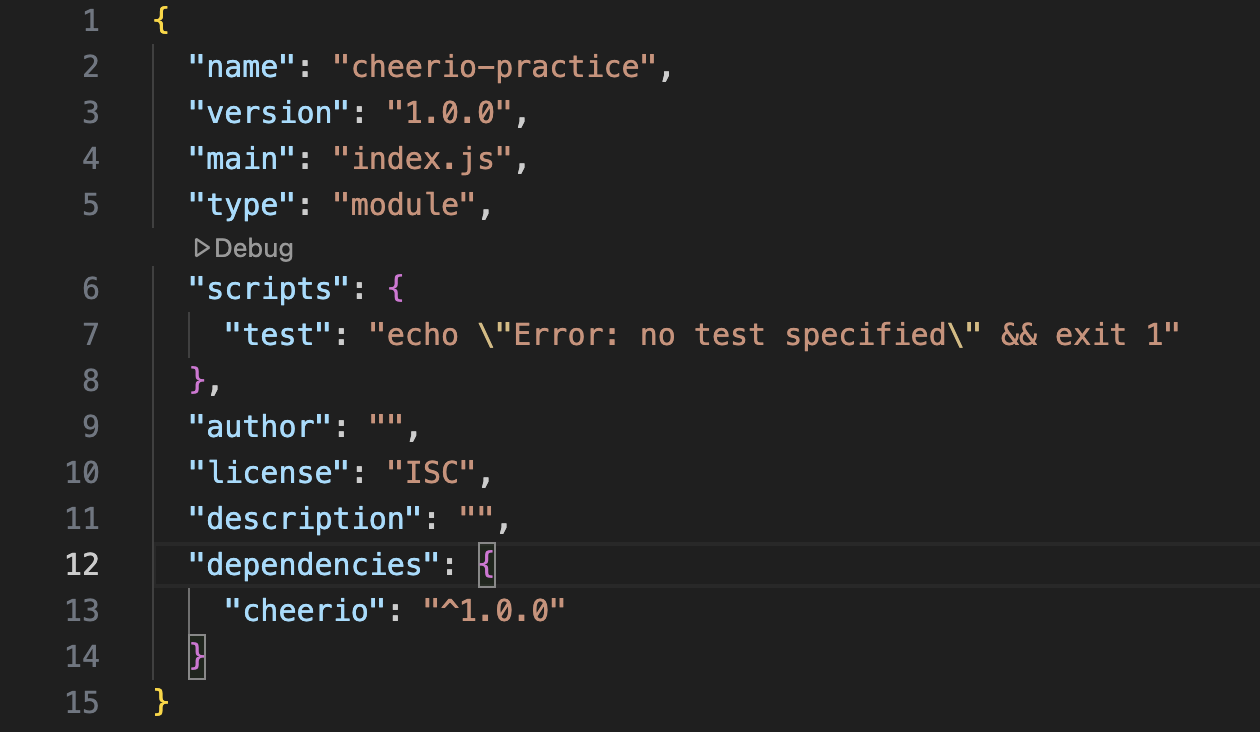
package.json 에서 type 부분을 확인하자! - commonjs 로 할지 module 로 할지
| 항목 | CommonJS | ESM (ECMAScript Module) |
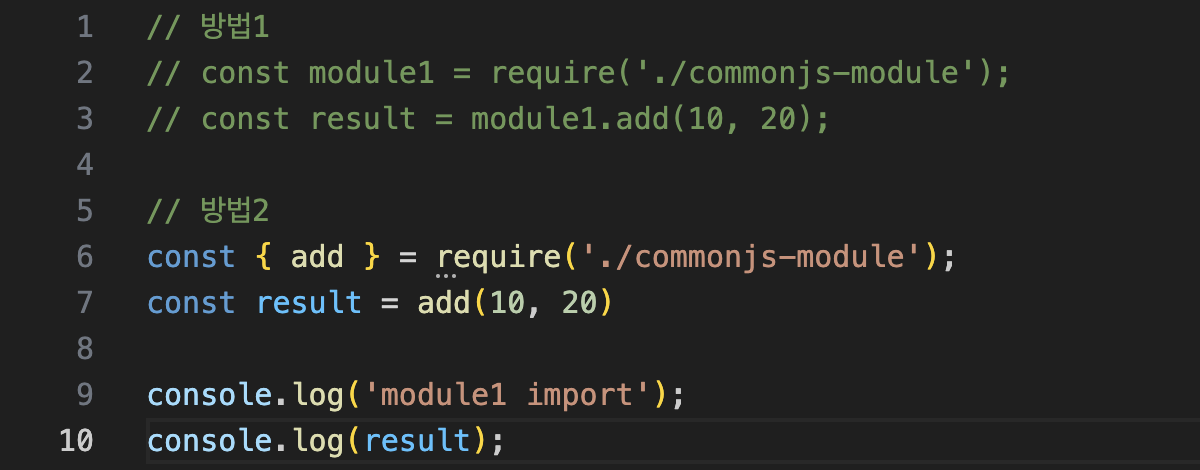
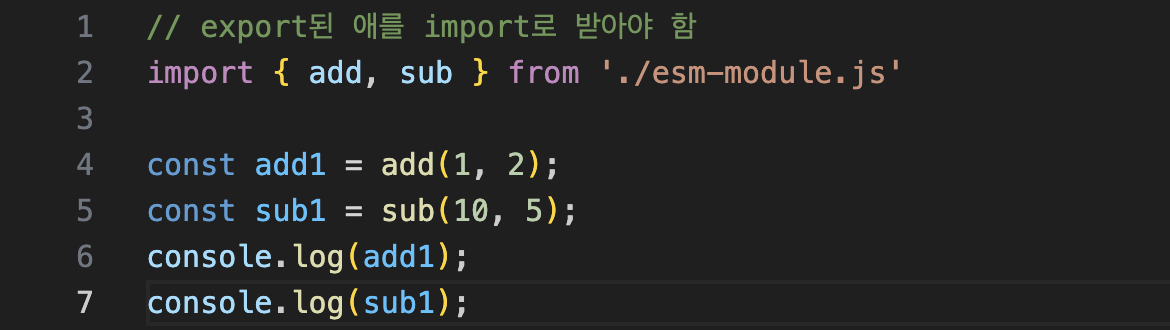
| 불러오기 | const cheerio = require("cheerio") | import cheerio from "cheerio" |
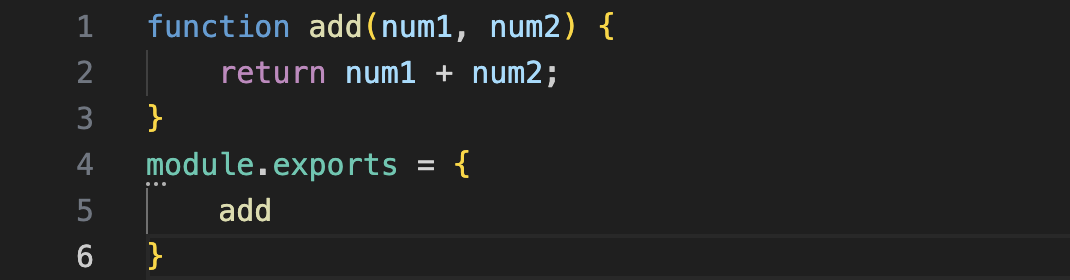
| 내보내기 | module.exports = ... | export default ... / export const ... |
| 실행 시점 | 동기(require는 즉시 실행) | 비동기(import는 lazy-loading 가능) |
| 파일 확장자 | .js만 사용해도 됨 | .mjs 또는 package.json에 "type": "module" 필요 |
| Node 지원 시기 | 오래전부터 (기본 방식) | ES6 이후 지원, Node.js 12 이상 완전 지원 |
| 호환성 | 대부분의 Node.js 패키지가 이 방식 | 점점 증가 중이지만, 일부 패키지는 호환 이슈 |
| 크롤링 시 영향 | require()로 쉽게 빠르게 적용 가능 | 최신 문법과 import 사용 시 설정 필요 |
CommonJS 방식
ESM 방식

cheerio 로 크롤링 해보기

연습문제1)
1. 해당 페이지에서 다음을 수집하여라. (quote:string, authorName:string, tags:string[])
2. 전체 페이지를 수집하여 JSON으로 저장하여라. (next 페이지 계속 넘어가서…!)
import * as cheerio from "cheerio";
import * as fs from "fs";

const url = "https://quotes.toscrape.com";

async function main() {
  const resp = await fetch(url);
  const body = await resp.text();
  const $ = cheerio.load(body);

  const quoteTags = $(".quote");
  const result = [];

  for (let i = 0; i < quoteTags.length; i++) {
    const quote1Tag = quoteTags.eq(i);
    const quoteTextTag = quote1Tag.find(".text");
    const quoteAuthorTag = quote1Tag.find(".author");
    const quoteTagTag = quote1Tag.find(".tag");

    // const tagArray = [];
    // for (let i = 0; i < quoteTagTag.length; i++) {
    //   const tag = quoteTagTag.eq(i);
    //   tagArray.push(tag.text());
    // }

    result.push({
      text: quoteTextTag.text(),
      author: quoteAuthorTag.text(),
      //   tag: tagArray,
      tag: quoteTagTag.map((_, el) => $(el).text()).get(),
    });
  }

  await fs.promises.writeFile("quotes.json", JSON.stringify(result, null, 2));
  console.log(JSON.stringify(result, null, 2));
}

main();
연습문제1 심화)
1. 저자에 대한 설명도 함께 저장
import * as cheerio from "cheerio";
import * as fs from "fs";

const url = "https://quotes.toscrape.com";

async function main() {
    let currentUrl = url;
    const result = [];

    while (currentUrl) {
        const resp = await fetch(currentUrl);
        const body = await resp.text();
        const $ = cheerio.load(body);

        const quoteTags = $(".quote");

        for (let i = 0; i < quoteTags.length; i++) {
            const quote1Tag = quoteTags.eq(i);
            const quoteTextTag = quote1Tag.find(".text");
            const quoteAuthorTag = quote1Tag.find(".author");
            const quoteTagTag = quote1Tag.find(".tag");

            result.push({
                text: quoteTextTag.text(),
                author: quoteAuthorTag.text(),
                tag: quoteTagTag.map((_, el) => $(el).text()).get(),
            });
        }

        const nextHref = $(".next a").attr("href");
        currentUrl = nextHref ? url + nextHref : null;
    }

    await fs.promises.writeFile("quotes.json", JSON.stringify(result, null, 2));
    console.log(JSON.stringify(result, null, 2));
}

main();
'Education > 신한투자증권 프로 디지털 아카데미' 카테고리의 다른 글
| TypeScript 기초 & React 기초 (2) | 2025.06.08 |
|---|---|
| JavaScript 크롤링 딥 다이브💦 (7) | 2025.06.06 |
| JavaScript Async&Await, Promise (6) | 2025.06.01 |
| JavaScript 기초 (7) | 2025.05.29 |
| [신한투자증권 프로디지털 아카데미] 실무형 웹페이지 실습(1) - 포트폴리오 만들기 (1) | 2025.05.25 |